SD Shield
Published
Reading and writing from an SD card with Arduino
Contents
Setup
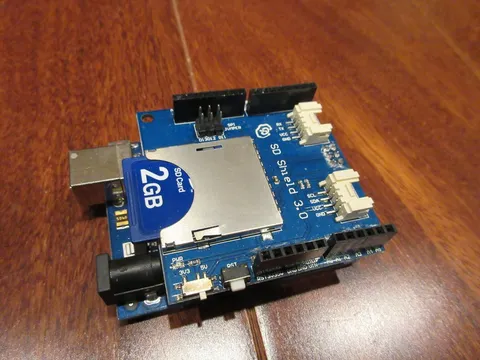
Put the shield on the Arduino, then insert a SD card into the socket (shown in the top image).
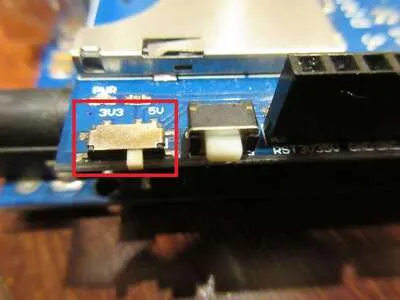
Important | If your shield has a voltage selection switch, set it to 5V. |
Example Code for SD Read/Write
#include <SPI.h>
#include <SD.h>

File f;

void setup() {
  Serial.begin(9600); // Open a serial port

  Serial.print("Initializing SD card... ");

  if (!SD.begin(4)) {
    Serial.println("Failed.");
    return;
  }
  Serial.println("Done.");

  f = SD.open("test.txt", FILE_WRITE); // Create test.txt

  if (f) { // open success
    Serial.println("Writing to file");
    f.println("This is a file test");
    f.close(); // Close file
    Serial.println("Done.");
  } else {
    // Open failed, show an error
    Serial.println("Error opening file");
  }

  // Open file for reading
  f = SD.open("test.txt");
  if (f) { // file opened successfully
    Serial.println("Reading file");
    while (f.available()) {
      // Read from file until reached the end
      char ch = f.read();
      Serial.print(ch);
    }
    f.close(); // Close the file
  } else { // file open failed
    Serial.println("File open failed.");
  }
}

void loop() {} // Empty loop
Initialization and Setup
The SD shield uses SPI to communicate with the Arduino, so SPI.h is included along with SD.h.
The File object called f represents a file on the SD card, and it is used to perform I/O on the actual file it represents.
SD.begin initializes the SD shield. It returns a status code, so we can check for failure and print a message to the serial monitor.
Writing to a File
To open a file for writing, open it in write mode with SD.open. In the code, the opened file is represented by f. If the file does not exist, it will be created. To write to the file, use the following methods:
print: Writes a string.println: Writes a string followed by a newline.
Reading from a File
To open a file for reading, do not specify the open mode (it defaults to read mode). To read from the file, use the following methods:
available: Checks if there is still data to read (we haven’t yet reached the end of the file)read: Reads one byte from the file
Closing a File
When you are done with a file, close it with close.
Important | Always remember to close a file after using it with close() to save the Arduino’s resources. |